Managing data in Amazon Aurora MySQL-Compatible Edition for analytics or machine learning is increasingly common. Organizations often need to run complex analytics or join data from multiple sources, which can be challenging directly on a transactional database.
By extracting data from Aurora MySQL to Amazon S3 Tables in Apache Iceberg format, you can alleviate the load on your production database while leveraging a fully managed table store optimized for analytics. This setup allows for querying with tools like Amazon Athena and Apache Spark, enabling richer insights by combining relational and other datasets.
Apache Iceberg is a popular open table format that supports ACID transactions, schema evolution, and time travel, allowing multiple engines to operate on the same dataset concurrently. Amazon S3 Tables is designed specifically for analytics workloads, offering significant performance improvements over self-managed tables.
Setting Up the Solution
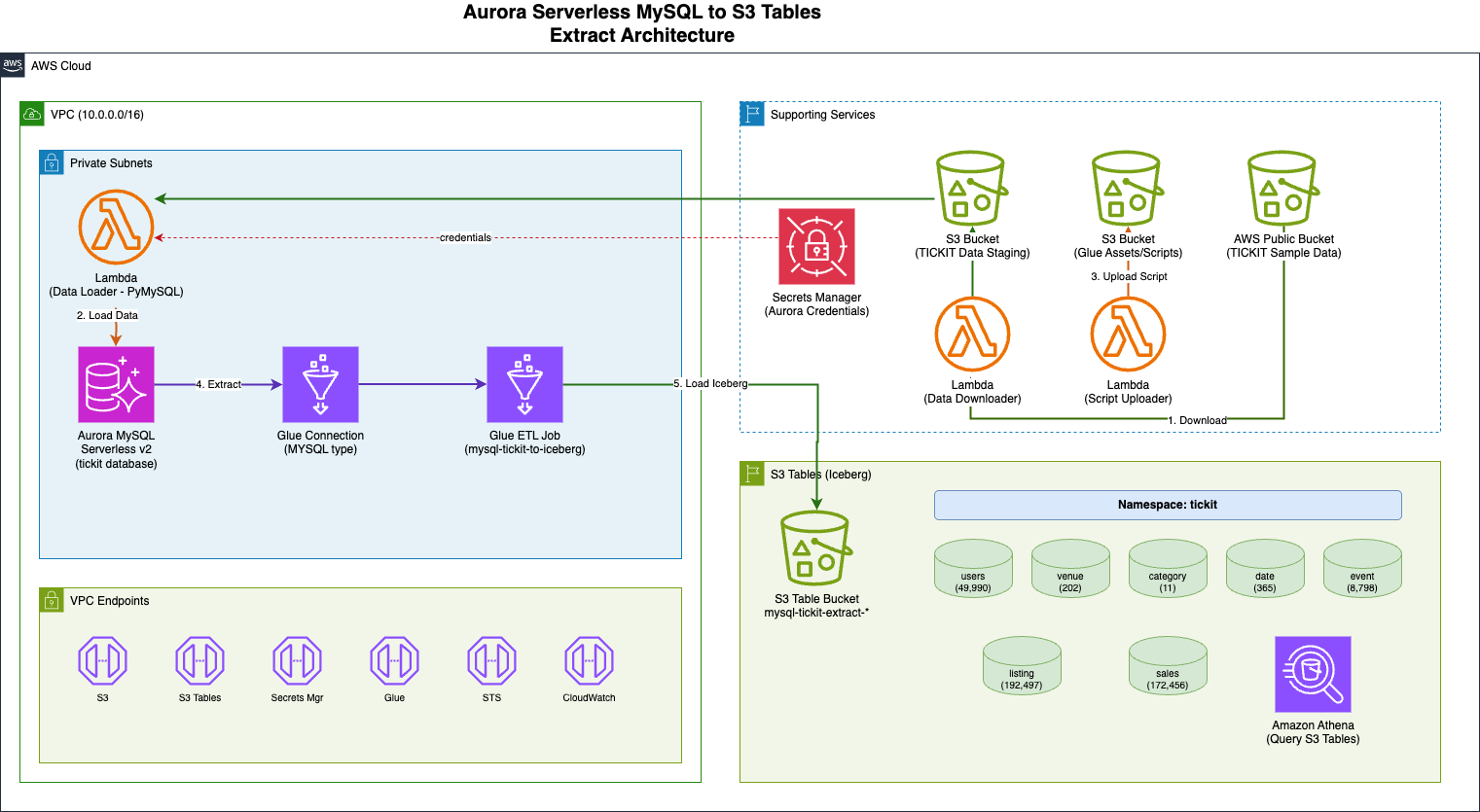
This guide will walk you through automating the extraction of tables from Amazon Aurora MySQL Serverless v2 to S3 Tables using AWS Glue. The infrastructure is deployed via a single AWS CloudFormation stack.
Currently, there is no native zero-ETL integration between Amazon Aurora and S3 Tables, which means organizations must navigate several requirements to utilize S3 Tables effectively.
CloudFormation Template
A provided CloudFormation template will help you provision the necessary infrastructure, load sample data, and configure the ETL pipeline. The solution utilizes the TICKIT sample database, which simulates a ticket sales system with seven interconnected tables.
Implementation Steps
- Deploy the CloudFormation template from this link.
- Retrieve the necessary parameters such as AuroraClusterEndpoint, DatabaseName, and SecretArn from the CloudFormation stack.
- Run the AWS Glue job
mysql-tickit-to-iceberg-jobto initiate the data extraction process. - Verify that the tables have been created in your S3 Table bucket.
Post-Implementation
After the AWS Glue job completes, you can query the migrated tables using Amazon Athena to ensure data integrity. Remember to clean up resources to avoid unnecessary charges.
In conclusion, this post demonstrated how to extract data from Amazon Aurora MySQL Serverless v2 and write it to Amazon S3 Tables in Apache Iceberg format using AWS Glue. This automated pipeline can be replicated across different environments, allowing for efficient data management and analytics.